Breaking change check#
Available on Enterprise plans only, on a dedicated or private BSR instance.
The breaking change check enforces Buf’s breaking-change rules on the default label of each module.
What happens when a push violates the configured policy depends on whether the review flow is enabled:
- Review flow on: the commit is stored but enters a pending state and the default label doesn’t move to it.
- Review flow off: the push is rejected outright with the check error.
This page is for BSR administrators turning the check on or off; it also covers what developers pushing modules see, since the BSR check interacts with their local buf.yaml configuration.
The check is off by default; enabling and disabling it requires BSR admin access.
How it works#
When the check is enabled, the BSR enforces one of two breaking-change rule sets on commits that try to advance the default label:
FILE(default): the strictest policy. Catches anything that would break wire or source compatibility at the level of individual files.WIRE_JSON: catches changes that break wire (binary) or JSON encoding. Looser thanFILEbecause it tolerates source-level reorganization within a package.
For the full rule lists, see breaking-change rules.
With the review flow enabled, a violating commit is stored, but the default label doesn’t move and the commit is marked pending until a reviewer resolves it. Other label lineages can still resolve normally to the pending commit if they explicitly point at it.
A repository or module owner with admin role can approve or reject the pending commit:
- Approve: the commit clears the policy and the default label can advance to it.
- Reject: the default label won’t advance to this commit. Existing references to the commit (explicit commit ID lookups, other label lineages that already point to it) continue to resolve.
Notifications:
- The CLI prints a warning when a push enters the pending state.
- Owners and admins on the affected resource see the pending commit in the BSR UI and receive email notifications.
- The original committer is emailed the final decision (approved or rejected).
Interaction with buf.yaml and buf breaking#
When the BSR check is enabled, local development workflows continue to work; the BSR-side check coexists with anything you’ve configured in buf.yaml:
buf breakingstill uses the localbuf.yamlconfiguration. Individual teams can be stricter than the BSR-wide policy, but they can’t be looser than what the BSR enforces on push.- On
buf push, the BSR’s policy always wins for pushes that advance the default label. Ifbuf.yamldisables breaking-change checks entirely, the BSR still enforces its policy.
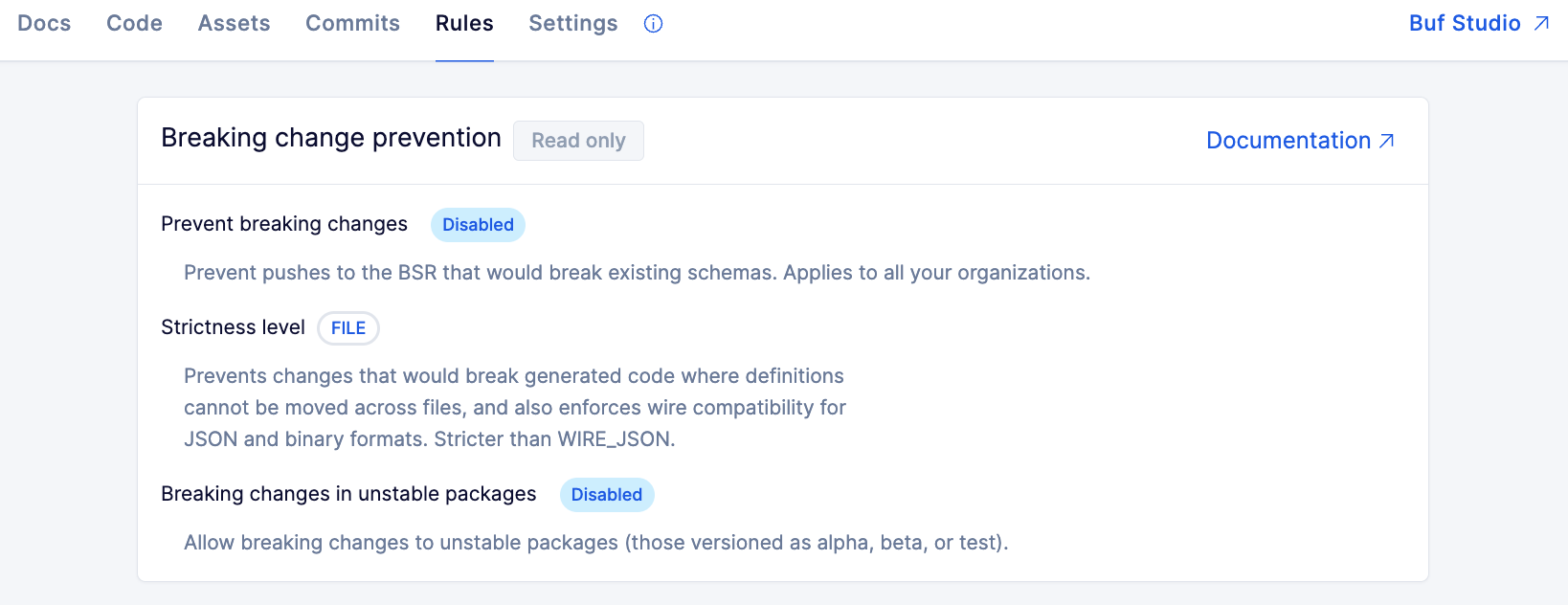
To see the BSR-side policy currently applied to a module, open the Rules tab on any module page in the BSR.
Unstable packages#
By default, the check enforces breaking-change rules on every package.
Toggle Unstable packages in the admin panel to allow breaking changes in packages whose last component matches an unstable version pattern: v\d+alpha\d*, v\d+beta\d*, v\d+test, plus the equivalent patch variants.
Examples that qualify as unstable:
foo.bar.v1alpha1foo.bar.v1beta1foo.bar.v1test
Examples that don’t (treated as stable, breaking-change rules apply):
foo.bar.v1foo.bar.v2foo.alpha.v1(only the last component counts)
Enable this when teams legitimately need to iterate on early-stage APIs without going through the review flow for every breaking change.
Enable the check#
-
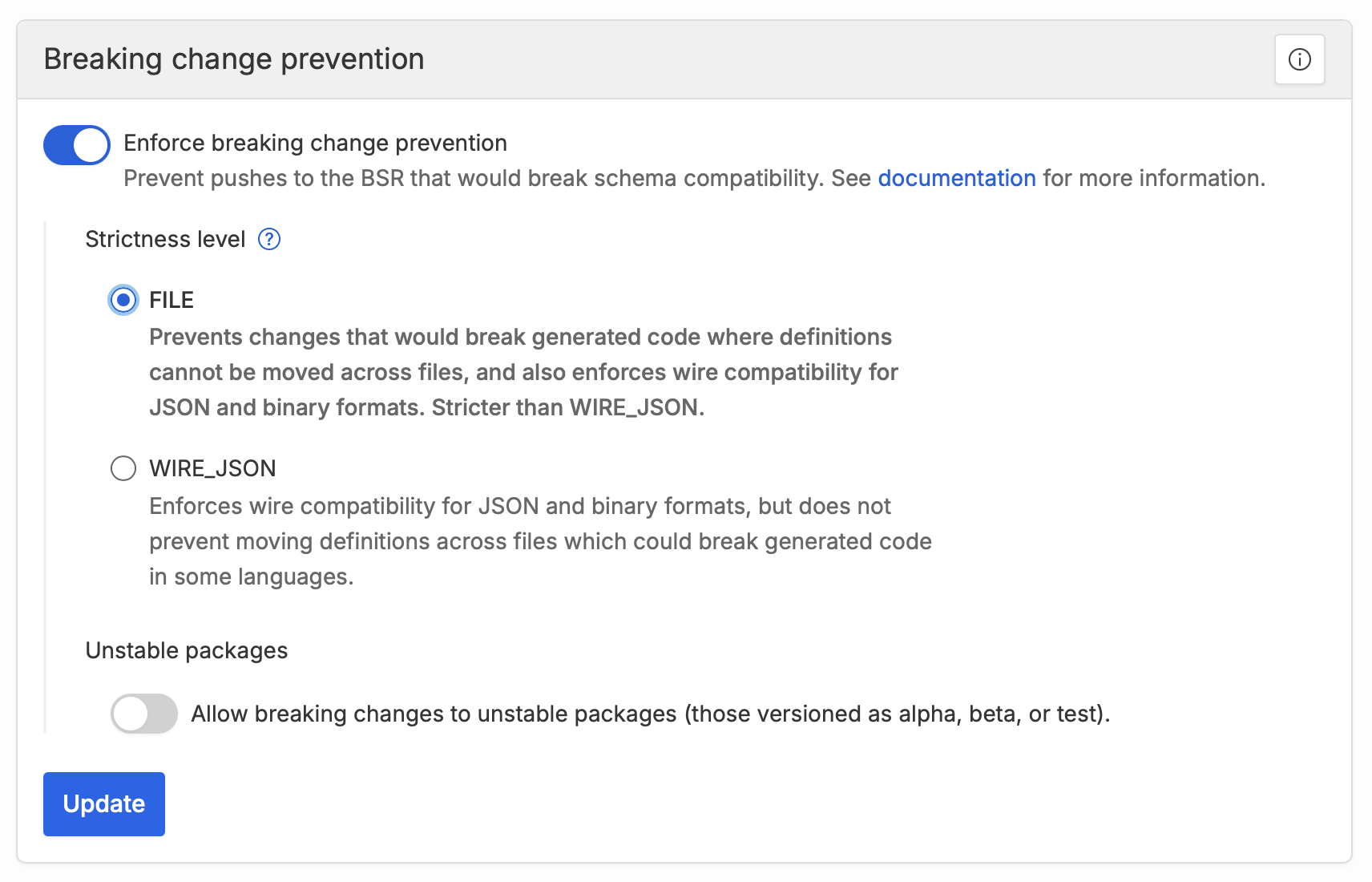
Open the admin panel and select Checks under Settings.
-
Turn the Breaking changes toggle on.
-
Choose the rule set to enforce:
FILEorWIRE_JSON. -
Optionally turn on Unstable packages to skip the check for unstable-versioned packages.
-
Click Update to save.
The policy and the unstable-packages toggle can be changed at any time after the check is on. Changing settings affects future pushes only; the BSR doesn’t re-evaluate existing commits.
Disable the check#
Pending commits must be resolved before the check can be disabled, so dangling pending commits don’t accumulate.
Resolve pending commits#
The admin panel lists every repository with pending commits and supports bulk approve and bulk reject. Use bulk actions when the pending commits are uniform; click into a repository to handle commits individually.
Turn the check off#
Once no commits are pending:
- Open the admin panel and select Checks under Settings.
- Turn the Breaking changes toggle off.
- Click Update to save.
Already-rejected commits remain unavailable to downstream consumers even after the check is disabled.